Doc Plan Example
This documentation plan combines aspects of what JoAnn Hackos calls
Information Plan
- goals and objectives
- audience definition
- task list
- media selection
Project Plan
- estimate of costs (people, time, and money)
- schedule of milestones (drafts and reviews)
- selection of tools
- localization plan
- usability test plan
- maintenance plan
- Documentation Plan (Version 2)
- Documenting Software with Hypersnap-DX
- Revision History
- Version 2, June 16, 2000, more complete
Version 1, June 10, 2000, bare bones
- Primary Author
- Thomas Albert
- Roles and Responsibilities
- Primary Author: Thomas Albert
Documentation Project Manager: Thomas Albert
Subject Matter Experts (SMEs): (engineering, tech support, QA, marketing, project
management, BOM production)
Reviewers: Technical Communicators in EDP 314237
- Goals and Objectives
- To document the concepts, procedures, and reference material that enable the audience to
quickly and effectively use the screen capture and image editing features of HyperSnap-DX.
- Audience Definition
- Technical communicators (or software developers) documenting the user interface of a
software application. I assume that the audience is able to use Windows, a web browser,
and an authoring tool, such as Word or FrameMaker.
- Audience Task Analysis
- A user installs the product over the web, creates screenshots, saves screenshots,
converts screenshot files from one format to another, crops and resizes screenshots.
- Description of the Product
- The document is about Hyperionics HyperSnap-DX, a utility (available at http://www.hyperionics.com) for screen capture,
image format conversion, image resizing, and minor image manipulation.
- Scope Definition for the Document
- This documents covers concepts, procedures, and reference information essential to
using the product quickly and efficiently. The following are OUTSIDE THE SCOPE of this
document: installing the product (a separate task that Hypersnap's existing documentation
covers clearly); operating system details, such as how to use a mouse; authoring tool
details, such as how to insert screenshots into documents.
- Media Selection for the Document
- To maximize availability and the ability to use the document in the context of the
audience's working environment, this document will be delivered in HTML.
- Estimated Costs
- One writer, ten weeks, and $25 for HyperSnap-DX (there is a free version, but it shows
advertisements)
- Task List/Information Sources
- Use product, read existing documentation, write drafts, contact software developer if
necessary
-
- Schedule (Project Milestones)
- 6 June: Draft of Documentation Plan (this document)
17 June: Develop Template, Draft of Concepts Chapter
24 June: Draft of Procedures Chapter
1 July: Draft of Reference Chapter
8 July: Revisions, indexing, write usability testing scenario
15 July: Documentation Usability Test
22 July: Presentation of the Portfolio Piece to the technical communicators of EDP 314237
- Selection of Tools
- For screen captures: Hyperionics HyperSnap-DX 3.61
For text authoring: Microsoft FrontPage 2000
For conceptual diagrams: Visio Professional 5.0
- Localization Plan
- Verify that the document adhers to the guidelines of http://www.wordesign.com/localization/index.htm
- Usability Test Plan
- Request that one or more of the technical writers in EDP 314237 act as a subject that
uses the document along with the software in a test scenario that includes a test
facilitator and two observers. I will write the test scenario after I have drafted the
procedures chapter.
- Maintenance Plan
- I will update if later versions of the software include features of interest to
technical communicators, or if my increasingly usability awareness leads me to a better
way to organize or present the technical material.
- Preliminary Table of Contents
- Title
Contents [1 page]
Preface (purpose/organization, audience definition, conventions) [1 page]
- Concepts of Image Capture and Image Manipulation [3 pages]
image formats (authoring tools and delivery medium)
image resolution (consistent sizing versus showing only points of
interest)
How to Capture and Manipulate Images [6 pages]
capture (window, region, include/exclude cursor)
manipulate (crop, scale, convert)
Reference Material for Using HyperSnap [2 pages]
keyboard shortcuts
list of resources on image formats
Index [1 page]
- Estimated total page count
- 12 pages
- Estimated number of graphics
- 12 gifs
- Estimated hours
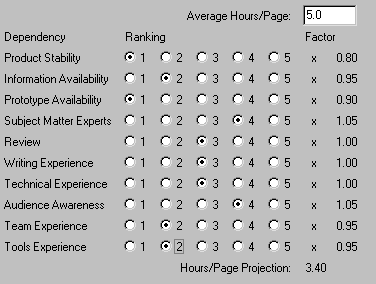
- 3.4 hours per page * 12 pages = 40.8 hours
- Dependencies
- This documentation project is independent of other software or documentation
developments.
- Risks
- Hardware unreliability
Running out of disk space to store the growing document
Shortage of human resources to develop the document
Shortage of human resource to review and/or test the usability of the document